The changes in Cisco Secure Client 5.1.13 are largely what one would expect from the thirteenth maintenance release of any software: some minor feature changes and bug fixes. What the release notes do not discuss is a significant change to the way Cisco Secure Client is packaged for macOS.
First brought to my attention by David Pirie in Mac Admins Slack, the GUI client, Cisco Secure Client.app, is now in a distinct Installer.app choice. As previously discussed on this blog, installing Cisco Secure Client on macOS at scale requires the use of a choice changes XML file, as almost no one would be installing all the components. The choice changes XML instructs installer(1) which components to install. Each choice in the file maps to a software component. Having an additional choice gives Mac admins the option of not installing the GUI app if they don’t require it.
Contents
In the predeploy package, the new choice_ui contains:
- The GUI app, /Applications/Cisco/Cisco Secure Client.app
- An uninstall script (discussed later)
/opt/cisco/secureclient/bin/gui_uninstall.sh - Component registration so that other components, such as VPN, can declare their dependency on this component
/opt/cisco/secureclient/install/component/secure-client-ui.json
Cisco Secure Client.app was previously in the Core VPN module (choice_anyconnect_vpn). The other files are new in CSC 5.1.13.
It’s also worth noting that the postinstall step that enables a launch agent for the GUI is part of this choice. (This was previously, strangely, part of the Umbrella module.) On macOS 13 and later, the postinstall script calls:
"/Applications/Cisco/Cisco Secure Client.app/Contents/MacOS/Cisco Secure Client" install
which also launches the app. This can undone with:
"/Applications/Cisco/Cisco Secure Client.app/Contents/MacOS/Cisco Secure Client" uninstall
On macOS 12 (which no one should be using) and earlier, the postinstall script drops a launch agent in /Library/LaunchAgents and bootstraps it. This can undone by booting it out and deleting it.
Install experiences
GUI
When 5.1.13’s Cisco Secure Client.pkg is launched from Finder, all the component choices are listed and selected by default. However, the new UI choice is hidden from this view.
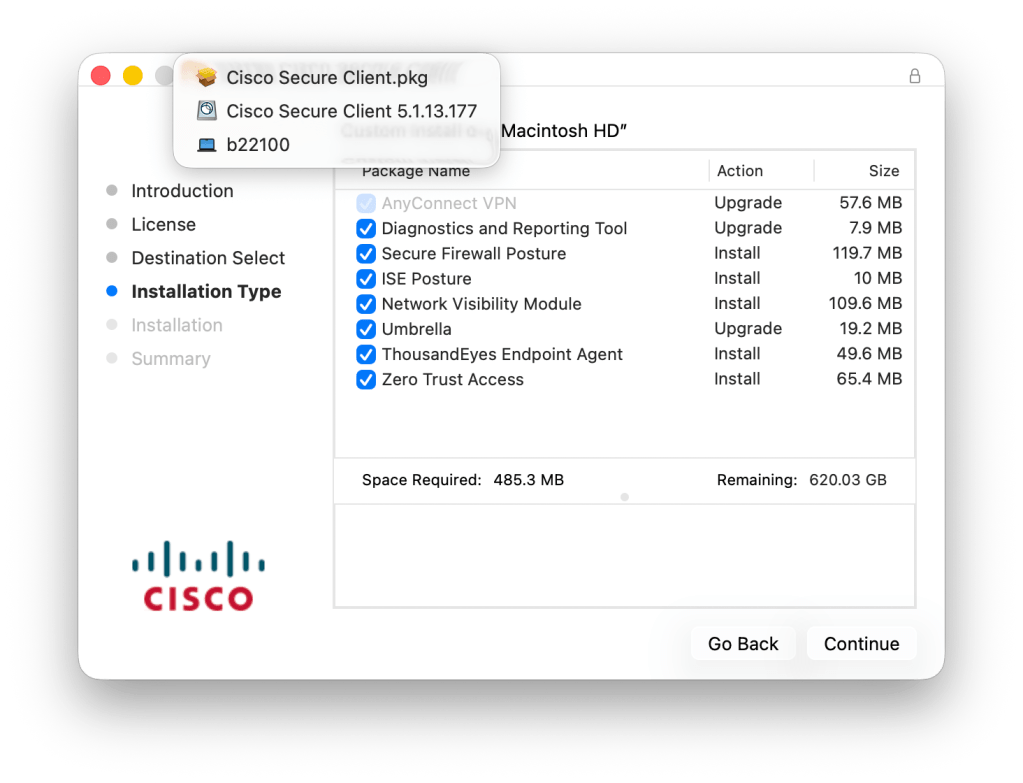
Because it’s selected by default, if you install or upgrade here, the GUI will be installed.
Choice Changes
A choice changes XML that selects choice_ui or doesn’t specify what to do with it, will result in the GUI app being installed and launched as spelled out above.
Use of a choice changes XML that explicitly de-selects choice_ui will result in the GUI app not being installed or launched. Add the following to the array in one’s choice changes XML file to de-select it:
<dict>
	<key>attributeSetting</key>
	<integer>0</integer>
	<key>choiceAttribute</key>
	<string>selected</string>
	<key>choiceIdentifier</key>
	<string>choice_ui</string>
</dict>
Also, upgrading to CSC 5.1.13 with the above XML will uninstall the previous version’s GUI app, and not install the 5.1.13 GUI.
Uninstalling
The GUI has a new uninstall script. Running it while dependent components are installed will throw an error:
% sudo /opt/cisco/secureclient/bin/gui_uninstall.sh
Dependencies list for component:
VPN
Uninstall any dependent component if you can, or since you can’t uninstall the VPN component, add a -f or --force to the command if you still want to remove it.
% sudo /opt/cisco/secureclient/bin/gui_uninstall.sh -f
Force uninstall flag detected. Skipping GUI consumers verification.
Uninstalling Cisco Secure Client - GUI...
Successfully removed Cisco Secure Client UI from the system.
After uninstalling, modules that do not rely on the GUI, such as Umbrella, continue to function.
Checking status
With no GUI installed, one will have to use other methods to determine the status of their modules. Here are a few ideas centered around the Umbrella module:
systemextensionctl list will show that the system extension is loaded and enabled
Umbrella data files are now found in /opt/cisco/secureclient/umbrella/data/regionaldata/global/data
Verify information in the erc_state.plist and sync-latest.plist files
For Umbrella DNS, look up a known blocked DNS record and verify it has an Umbrella block page IP address. Alternatively, query the Umbrella debug record with dig TXT debug.opendns.com. One should see their orgid as a confirmation that Umbrella DNS is working.
The Umbrella web console shows client status. Here’s an example from testing CSC 5.1.13 without the GUI installed:
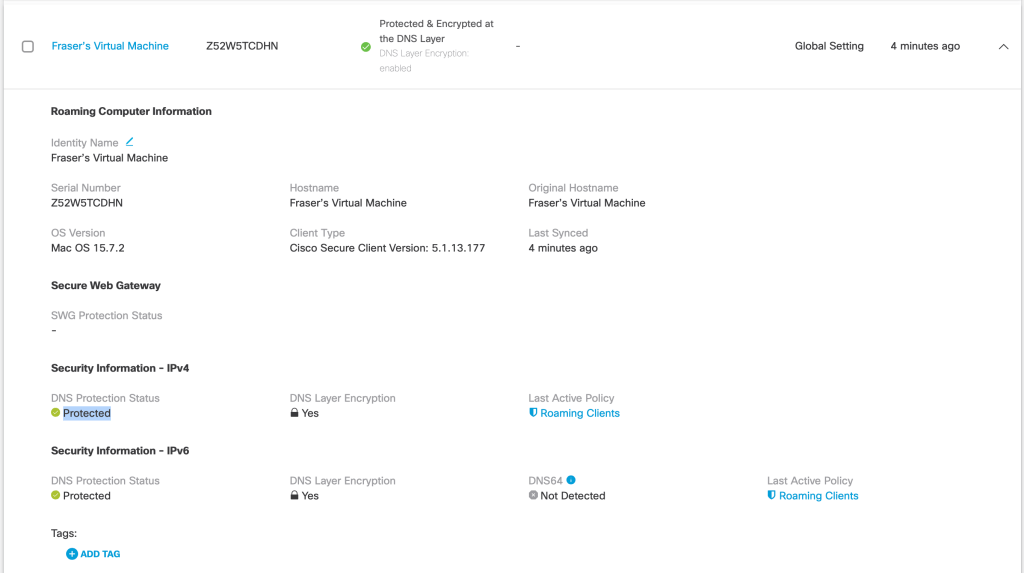
Lastly, CSC includes Cisco DART (Diagnostic and Reporting Tool) which will gather logs relating to all CSC modules, the operating system, and the network state. It’s scriptable too.
A word about webdeploy
So far, we have only discussed the “predeploy” package. Cisco also provides the webdeploy package to place on VPN gateways for in-place upgrades on connect. The webdeploy version of CSC 5.1.13 always installs the GUI. This is understandable as one would have used the GUI to connect to the VPN gateway and would still need a GUI to continue to do so. That said, the webdeploy version still includes the new uninstall script.
 macadmin.fraserhess.com
Leave a comment