Netskope has become a somewhat popular option in the Security Service Edge space. It provides, amongst other things, a “web proxy in the cloud” for endpoints. More Mac admins are being tasked with deploying and supporting the Netskope Client. Membership in the Netskope channel of Mac Admins Slack has increased 1300% in the last 2.5 years. Netskope’s macOS support has improved from when it took more than a year to deliver a functional System Extension and 18 months to have a native Apple Silicon version. While Netskope didn’t support macOS Sonoma on day one, it was supported within the first month.
(I have worked with Netskope for more than three years. Before transferring, I was on the security team that deployed Netskope in our organization.)
Release cadence
Netskope delivers a major release approximately monthly. Every third release is a more stable “Golden Release.” Releases are announced on support.netskope.com. Typically, the Netskope Client for macOS and other endpoint platforms is updated in tandem with the cloud service.
Please note that a hotfix version 109.1 of the Netskope client will be deployed as part of the release.
An example note regarding a client upgrade from a release announcement
Automatic software upgrade
Netskope offers automatic self-upgrades of the Netskope Client. These settings are in the Client Configuration portion of the Netskope tenant.
There are four software upgrade options:
- No automatic upgrades. Upgrades are fully controlled by administrators locally.
- Upgrade automatically to Latest Golden Release
- Upgrade automatically to Latest Release
- Upgrade automatically to Specific Golden Release

Latest Golden Release
Clients upgrade to the most recent golden release. This option was the most popular in an informal poll of Mac admins and keeps clients on a major version for roughly three months.
Latest Release
Clients upgrade to the most recent release.
Specific Golden Release
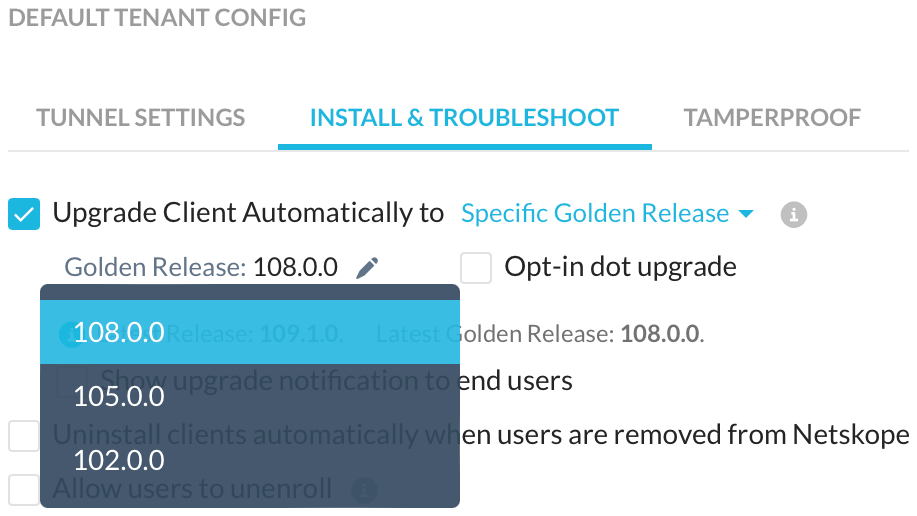
Allows the administrator to specify one of the last three golden releases to upgrade to automatically. The Opt-in dot upgrade option adds upgrading to hotfixes1 for the specified release.
What is a Golden Release?
In conversations with Mac admins at other Netskope customers, I’ve encountered confusion over what version the Latest Golden Release is and how to get it. I don’t blame them. As I’ll demonstrate below, they are victims of poorly maintained documentation and static UI elements.
Why is this important? Twice in the past year, Netskope released hotfixes to correct incompatibilities with macOS. First, to fix a bug that manifested in macOS 13.4. Presently, macOS Sonoma support has been released in hotfixes, updating releases 109, 108, 105, and 102. In both cases, finding and downloading the hotfix release has been problematic.
Let’s look at the present golden release, R108. The first release of 108 was versioned 108.0.0.1555. Since that release, at least three hotfixes have been released. Most importantly, 108.1.2.1557, which supports macOS Sonoma.
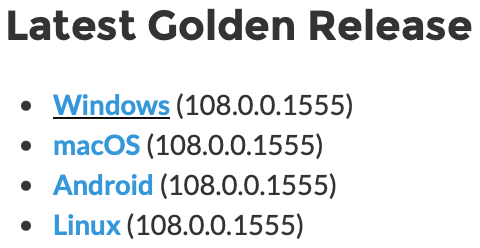
However, upon the release of 108.1.2, the Download Netskope Client and Scripts article listed the Latest Golden Release as 108.0.0.15552:
Similarly, the Client Configuration in the Netskope tenant lists the Latest Golden Release as 108.0.0:

However, neither of these sources of information reflect the reality of clients configured to upgrade to the Latest Golden Release. Since R108 was released, those clients have installed the following versions:
- 108.0.0.1555
- 108.1.0.1548
- 108.1.1.1550
- 108.1.2.1557
The knowledge base download article and the settings UI in the tenant are not in sync with the actual Latest Golden Release. Over the last three years I’ve seen this discontinuity multiple times, a result of the lag between software releases and the manual update of static content. My working definition of a Golden Release is:
Any release added by Netskope to the Specific or Latest Golden Release auto-upgrade mechanisms is an ipso facto golden release.
This definition is consistent with Netskope’s definition of the Latest Golden Release auto-upgrade option (emphasis mine):
All clients are upgraded to the latest golden release. The golden release version includes dot/hotfix release updates and automatically updates to the latest available.
If critical fixes are delivered in hotfixes, the Latest Golden Release must always be available for admins to download manually, not just available via automatic software upgrade. These installers are used in provisioning and by organizations that do not opt into automatic upgrades.
Potential improvements
I encourage Netskope customers, especially if they don’t use automatic upgrades, to petition Netskope for the following:
- A download archive page for all client releases
- Release notes or other documentation for all releases, as not all hotfix releases receive any documentation
- The tenant should dynamically update the Latest Golden Release and the Latest Release versions in the Client Configuration web interface in sync with the automatic software upgrade system
- A download link for the Latest Golden Release similar to
https://download-<your-tenant>.goskope.com/dlr/<platform>/getfor the Latest Release3
Until we have better options for downloading the Latest Golden Release of Netskope, I have written a script that downloads a specific Netskope Client version. It requires a Mac with the Netskope Client installed and configured with an automatic upgrade option.
- One should note that Netskope Client hotfix releases are in fact full installations, not deltas ↩︎
- A week after 108.1.2.1557 was released, this support article was updated to list 108.1.2.1557 as the Latest macOS Golden Release and offer it as a standalone download. The Client Configuration UI remained unchanged. ↩︎
- Such a URL would enable scripted download and installation of the Latest Golden Release ↩︎
 macadmin.fraserhess.com
Leave a comment